

Bill Split Pro

Track & Divide Group Expenses

Create a group, add participants, and share a unique link so everyone can join and add expenses together. Everything stays organized in one place with clear balances and an automatic settlement plan. 

Create Your Group

Set up a new bill splitting group and share the link with anyone involved.

This password will be required to access the group. Share it only with trusted participants.

⚠️ Important: Save the group URL and password! Without them, you might lose access to this group.
Cancel

Browser-Based

No app downloads or registrations required.

Share One Link

Everyone accesses the same calculation instantly.

Real-Time Sync

Updates across all devices automatically.

Team Lunch

6 people · Today

$240.00

$40 per person

Monthly Rent

3 roommates · Dec

$1,800.00

$600 per person

Utilities

4 people · This week

$180.00

$45 per person

150+

Countries

<15s

Setup Time

Groups & Bills

24/7

Access Anywhere

Shared Expenses Made Simple

Splitting shared expenses should feel quick and natural, not like another task on your to-do list. Whether you’re organizing a trip, dinner, event, or household costs, everyone should be able to see who paid, who owes, and how to settle up without unnecessary setup. The process should be clear from the start, even when multiple people are adding expenses throughout the group.

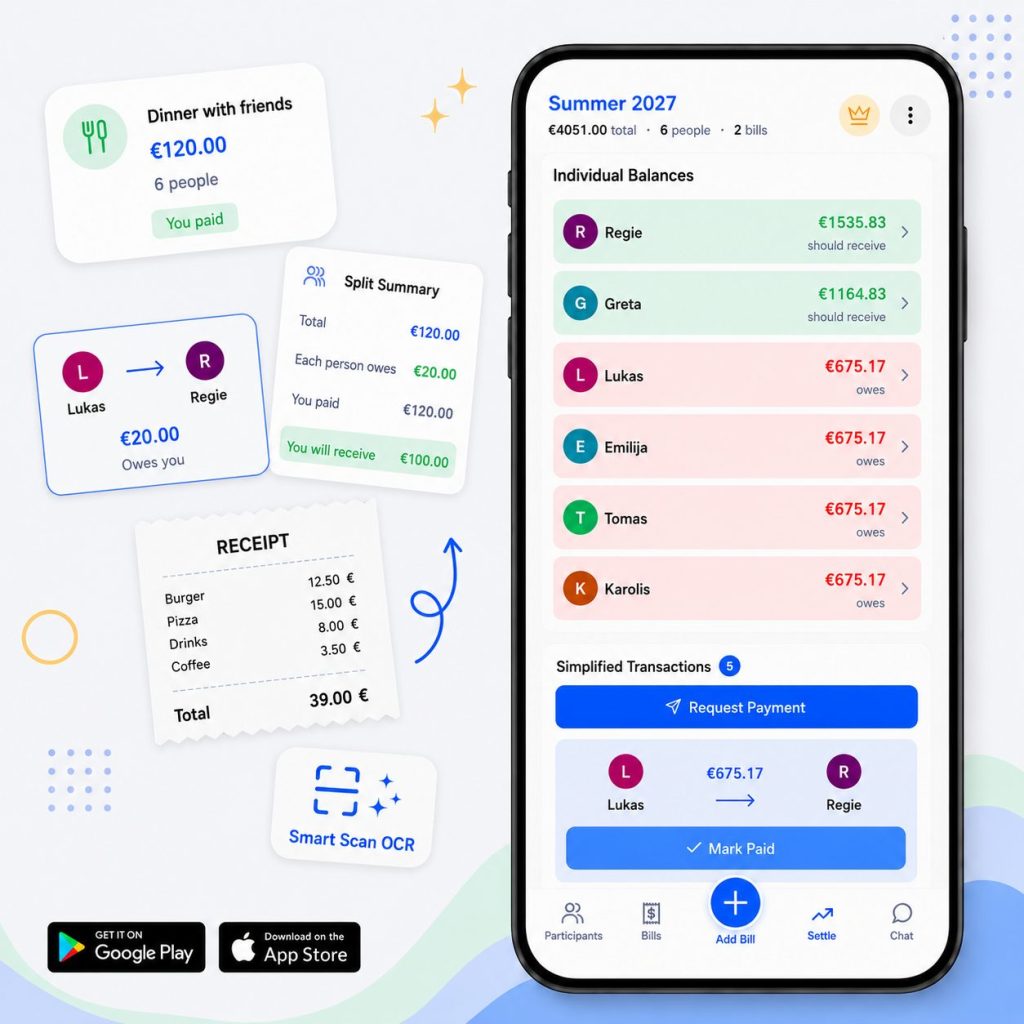
Bill Split Pro brings all group expenses into one shared space. Create a group, add participants, and record expenses as they happen. Everyone can join using a single link and view the same balances from any device. There are no accounts to create for every participant, making it easy to get a group started and keep it moving.

When it’s time to settle up, Bill Split Pro calculates balances automatically and creates a settlement plan with the fewest payments possible. It’s a practical way to split costs and keep group expenses organized without spreadsheets, messages, or manual calculations. Whether you’re tracking a single dinner or an entire trip, everyone can clearly see the final outcome and settle balances with confidence.

No Apps, No Downloads

Works instantly in any browser on any device. Share one link and everyone can join.

Advanced Splitting Options

Custom percentages, item-level breakdowns, and flexible split configurations for any scenario.

Real-Time Balance Tracking

See who owes what instantly with automatic calculations and balance summaries.

Complete Privacy Control

Password protection and secure data storage keep your expenses private.

Start Splitting in 4 Simple Steps

No complex setup, no apps to download. Just create and share.

1

Create a Group

Start by creating a new group for your event, trip, or shared expenses.

2

Add Participants

Add all the people who will be sharing expenses in your group.

3

Track Expenses

Log expenses and specify who paid and who shares the cost.

4

Get Settlement Plan

Our algorithm calculates the minimum transactions needed to settle all debts.

Want More Details?

Learn how Bill Split Pro works with detailed explanations and examples.

Use Cases

One powerful tool for every type of group expense- from restaurants to holidays. It works for any situation where people share costs, whether it's a trip, party, or daily household spending.

Restaurants

Split restaurant bills, add tip, and handle custom orders. Perfect for group dining where everyone orders differently.

Parties & Events

Track who bought drinks, food, decorations, and entertainment. Split costs fairly among all attendees.

Holiday & Travel

Manage trip expenses including flights, hotels, meals, and activities. Keep everyone on the same page throughout your journey.

Households

Manage shared household expenses including utilities, groceries, and supplies. Keep family or housemate finances organized.

Shared Shopping

Split grocery runs, bulk purchases, and online orders. Track who bought what and divide costs fairly.

Projects & Hobbies

Manage shared costs for team projects, sports leagues, hobby groups, or community activities. Keep everyone aligned on expenses.

Pricing

Start for free with all essential features. Upgrade to Premium for extended storage and an ad-free experience.

FREE

$0

Forever

7 Days Storage

Group data is kept active for 7 days after the latest activity.

All Core Features

Full bill splitting functionality.

Unlimited Participants & Bills

Add as many participants and bills as you need.

Real-Time Sync

Updates across all devices instantly.

Ads Present

Support our free service.

Customer Support

Self-service help resources.

Groups are deactivated after 7 days of inactivity and stored for 30 more days. After that, all data is permanently removed.

PREMIUM

$9.95

Per group, 365 days protection

Extended Storage - 365 Days

Your group data is kept for 365 days instead.

Ad-Free Experience

Enjoy a clean, distraction-free interface.

Premium Support

Dedicated support when you need help.

Monthly Group Reports

Get a monthly summary of expenses, balances, and spending activity delivered by email.

Support Development

Help us keep developing amazing features.

All FREE Features Included

Everything from the free plan plus more.

Upgrade available within any group. Secure payment powered by PayPal.

What Our Users Say

Join thousands of happy users who've simplified their group expense management.

Linda Vittoria

Nicole Luna

Henry

See What Others Say

Read more real experiences from people using Bill Split Pro for trips, rent, and shared bills.

Frequently Asked Questions

Get answers to common questions about splitting bills and using our calculator.

What is Bill Split Pro?

Bill Split Pro is an easy-to-use calculator that helps groups track and split shared expenses. It works on Android, iOS, and any browser, syncing everything in real time.

How does Bill Split Pro work?

Create a group, add participants, and log your expenses- Bill Split Pro automatically calculates who owes what. It finds the most efficient way to settle balances, reducing the number of payments needed between participants. Groups are automatically deleted after 7 days of inactivity to protect your privacy and keep the service running smoothly.

Why choose Bill Split Pro?

Most alternatives are app-based and require downloads, accounts, and setup before you can even start. Bill Split Pro works anywhere, on any device, without registration or installation. You open it, share a link, add expenses, and move on. It saves time and removes friction when splitting expenses with others.

Is Bill Split Pro really free?

Yes. All core features are free to use with no hidden fees or required registration. The $9.95 paid plan removes ads, extends data retention from 7 days to 365 days, and adds access to customer support. No core functionality is locked behind the paid plan.

Ready to Divide Shared Expenses?

Create your group now and get a clear breakdown of who owes whom.